
Review the content at the requested stage, then record a decision with Approve or Revise. A comment can explain your decision, but posting a comment alone does not approve the content or formally request changes.
You need access to the brand and permission to approve its content. If you are a client joining for the first time, accept your invitation before opening the review request.
Find the request and open the piece
- 01Select the correct brand, then in the sidebar open Content and select Approvals.
- 02Use Assigned to me for your requests. Use All approvals when you need the wider queue available to you.
- 03Filter by Plan, Media or Final if you want to review one stage at a time.
- 04Open the content piece and read the requested stage before making a decision.
Use Plan to check the brief or direction, Media to inspect the creative and Publish to review the prepared post and its platform-specific copy. Review the current version rather than relying only on a card thumbnail or an earlier conversation.
1. Open the requested stage
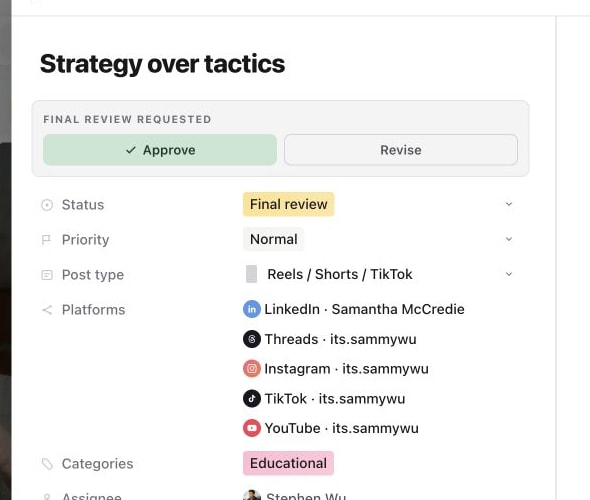
2. Use Revise when the piece needs changes
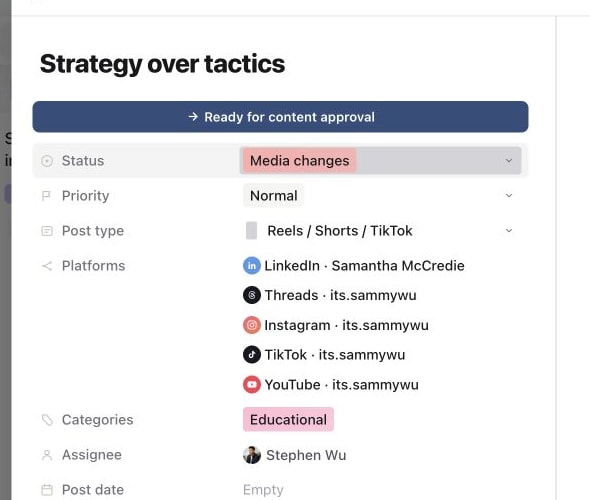
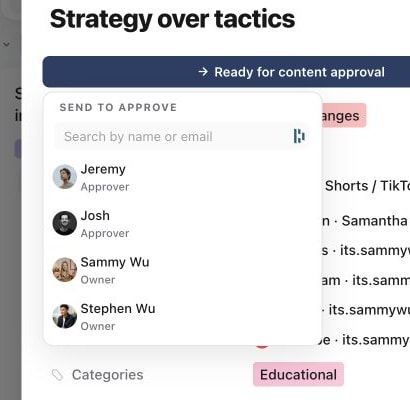
3. Select the next approver
4. Confirm the request was sent
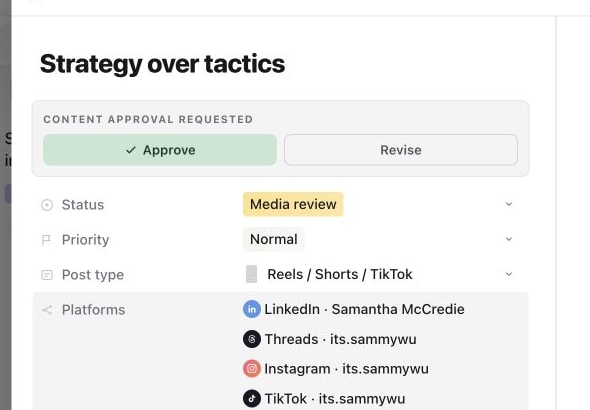
Approve the current stage
Select Approve when the requested stage is ready to move forward. The action records the approval and changes the workflow status for that stage.
| Stage being reviewed | After approval | After a request for changes |
|---|---|---|
| Plan review | Plan approved | Plan changes |
| Media review | Media approved | Media changes |
| Final review | Ready to post | Media changes |
Final approval makes the piece ready for publishing preparation or submission. It does not by itself queue or publish the post. The person responsible for publishing still needs to confirm the schedule or immediate publish.
Request changes with Revise
Open the piece and select Revise. Sequence records the change request and opens comments so you can explain what needs to change.
Make the feedback specific enough for the next person to act on. For example: “At 00:12, replace the old logo. Keep the approved opening. Shorten the LinkedIn caption's final paragraph to one sentence.” Use timestamped or visual feedback in Media when that helps identify the exact part of the creative.
Because Revise records the decision, do not click it merely to open a discussion. Use the comment control when you only want to ask a question without changing the review outcome.
Confirm the decision and follow the revision
Check the updated status. In Approvals, use Change requests or Approved to find the relevant outcomes. The piece's Activity also provides context for the work and decisions.
After changes are made, the production team can resubmit the content for review. Check the revised version and any customised captions again before approving it.
When an action is missing or the request changed
Check that you are in the correct brand, that the piece is at a review stage and that your access includes approval permission. If someone else has already changed the piece or its decision, refresh and inspect the current version before acting again. Ask the administrator to review access if you can see and comment on the piece but cannot make the required decision.
Was this page helpful?
Related articles
Need more help with this?