
Send prepared work to a named reviewer so they know which decision is needed. The reviewer must have access to the brand and permission to approve the work.
Send a post from the planner
- 01Check the Plan, Media or Publish information the reviewer needs before sending.
- 02Right-click the post in the planner and select Send for approval.
- 03Check Review step. Keep the destination marked Default to follow the post's saved route, or select an enabled review step such as Final review.
- 04Under Send to approve, search by name or email and select the intended reviewer. Selecting the person submits the request.
- 05Open Approvals and check the post's review stage and assignee.
The default depends on the current status and the workspace or brand setup. The standard routes include:
| Current status | Default review step |
|---|---|
| Idea draft, Planning or Plan changes | Plan review |
| Plan approved, In production or Media changes | Media review |
| Media approved, Post changes or Ready to post | Final review |
Custom routing can change these destinations. Read the actual Review step shown before choosing the reviewer. A custom review name appears only when that step belongs to the active status setup and is enabled.
Send several posts together
Select the intended posts in the planner, then choose Send for approval from the bulk toolbar. Review the stage summary under Review step before sending.
When selected posts have different default destinations, Default per post keeps each post on its own route. In this example, the selection contains one post for Media review and one for Plan review.
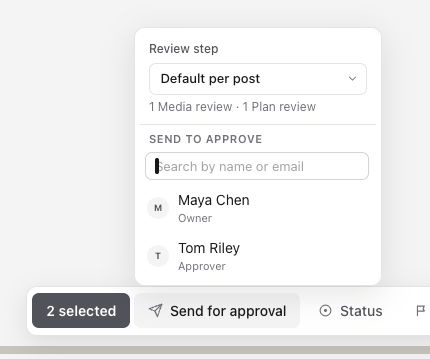
To send the selection to one stage, choose that stage in Review step. For example, selecting Final review changes the summary to 2 Final review. Check that every selected post is ready for that decision, then choose the reviewer.
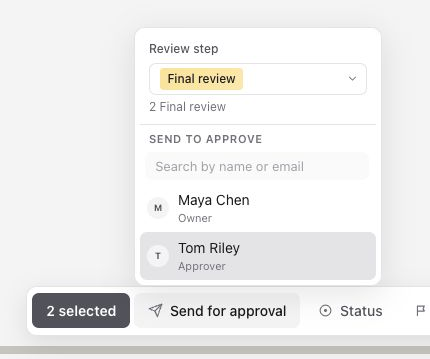
For a written post that skips media production, choose Final review directly in this picker. You do not need to upload a video or first move it to Media review.
Send from an open post
Open Status in the post's left properties panel and choose an approval step, such as Plan review, Media review or Final review, or one of your brand's custom approval steps.
Sequence asks Who should approve this? Under Send to approve, search by name or email and select the reviewer. Selecting the person submits the request. Dragging a post into an approval step on the board asks the same question. Changing an imported status alone is not proof that the intended reviewer received a request; send the work and check Approvals.
Check the request and continue
The post shows Approval requested and the review status. The example below shows the controls on an existing Final review post. Check Assignee on the request to confirm the intended reviewer.
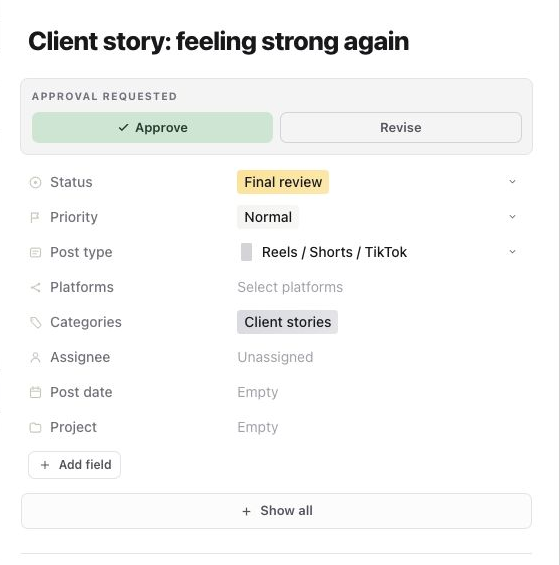
Sending replaces the post's current assignees with the chosen reviewer. After approval or requested changes, check the assignee and hand the post to the next person. Sequence does not automatically restore the previous assignees.
In the post panel, the reviewer selects Approve or Revise. Add specific feedback for revisions; a timestamp or annotation can make media feedback easier to follow. A comment alone does not record an approval decision.
With default routing, plan approval leads to Plan approved, media approval to Media approved, and final approval to Ready to post. Requested final-review changes lead to Post changes. Send again when the changes are ready; its default destination is Final review. Custom outcome routes can differ.
Final approval does not schedule or publish the post. Open Publish to confirm destination accounts and publishing time when it is ready.
If the intended client does not appear in the picker, check that they have access to the correct brand and approval permission. If no review step is available, check the enabled approval steps and routing in the active workspace or brand status setup.
To change the available steps and default destinations, see Use built-in and custom content statuses
Was this page helpful?
Need more help with this?