
Inbox brings direct messages, post comments, mentions and reviews from the brand's connected accounts into one place. Before replying, check both the person or post and the account you're replying from.
Find the conversation
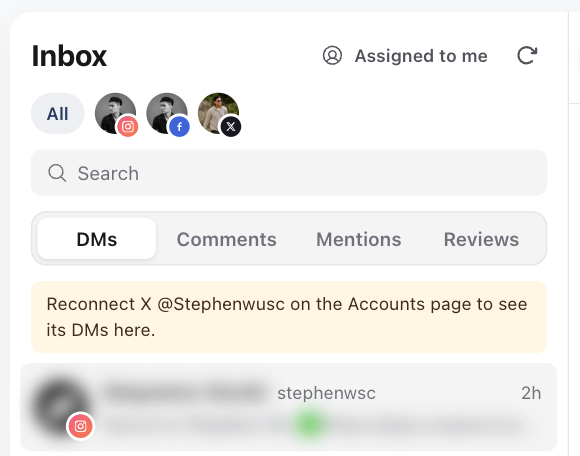
- 01Switch to the brand that owns the social account and open Inbox.
- 02Choose a tab: DMs, Comments, Mentions or Reviews. You only see the tabs your connected accounts support.
- 03Select an account icon above the list to see one account, or All to see every account. Use Search to find a person or post, and Assigned to me to see only conversations assigned to you.
- 04Open the conversation or post and read the context before replying.
If an account or conversation is missing, follow Fix missing Inbox access or conversations. Viewing, replying and private replies have separate account permissions.
Send a direct reply
In DMs, check the account shown in the conversation header. Type your reply and press Enter to send, or Shift+Enter for a new line. You can also select Send.

Use Attach a file, Record a voice message or Send a GIF to send media. Platform rules still decide what can be delivered: TikTok DMs take text or one JPG or PNG image up to 3MB, sent as separate messages.
Instagram and Facebook only accept replies within 24 hours of the person's last message. TikTok allows 10 replies within 48 hours of their last message. The composer warns you when you're close to either limit.
After sending, check that the message appears in the thread without an error. If the result is uncertain, check the thread or open the conversation on the original platform before sending the same message again.
Reply to a comment
In Comments, open the post and find the comment. Select Reply under it, write your reply, then select Reply or press Cmd+Enter (Ctrl+Enter on Windows) to post it. To comment on the post itself, write in the composer without choosing a comment first. Comment replies are public, so make sure each one suits everyone who can see the post.
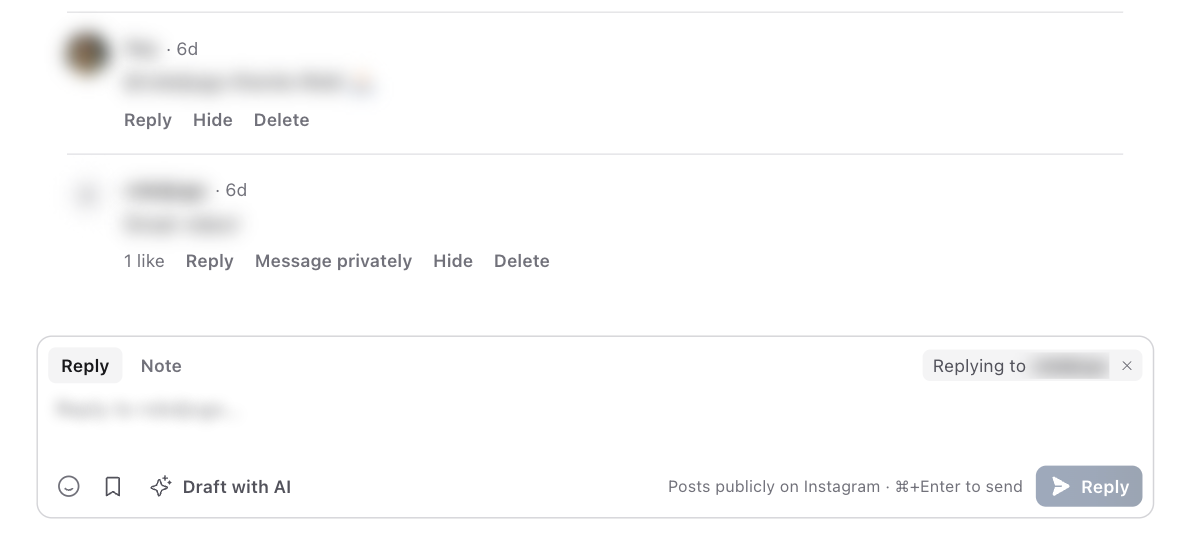
On Instagram and Facebook, Message privately sends the commenter a private message instead of a public reply. Each comment can receive one private message, within 7 days of the comment.
Depending on the platform, comments also have Like, Hide and Delete, and View opens the comment on the platform.
On TikTok, Pin pins a comment to the top of the post (one per post), and Load more replies shows every reply under a comment. TikTok only lets you delete your own comments.
Reply to reviews and mentions
Reviews shows recommendations on the brand's Facebook Page. Open a review, write your reply and select Post reply. Each review takes one public reply from Sequence. To change it later, edit it on Facebook.
Mentions shows Instagram Story mentions and posts that mention your LinkedIn company page. An Instagram Story mention opens the conversation it arrived in, scrolled to the mention, and you reply as a DM within Instagram's 24-hour window. LinkedIn doesn't let apps reply to mentions, so select Reply on LinkedIn to respond there.
Draft a reply with AI
Draft with AI writes a reply in your brand's voice using the conversation: the recent messages in a DM, the comment you're replying to (or the latest comments when you comment on the post), or the Facebook review. It's in the reply box for DMs, including Instagram Story mentions, comments and Facebook reviews. It isn't available for LinkedIn mentions or notes.
To steer it, type a few words first, such as "thank them and offer a free trial". The draft replaces what's in the reply box so you can edit it. Nothing is sent until you select Send or Reply.
Each draft uses 10 credits. If you don't see Draft with AI, ask a workspace owner or admin to give you AI access to that account's Inbox.
Work with your team
Select Assign in the conversation header to give the conversation to yourself or a teammate. A teammate you assign gets a notification. Select Unassign to clear it.
Switch the composer to Note to leave a note for your team. Notes appear under the conversation, and only your team can see them.

Use the Saved replies button in the composer to insert text your team uses often.
A reply is blocked or fails
Read the exact error. A platform can restrict replies because of its messaging window or conversation rules even when the original message is visible. Repeated sends do not remove that restriction.
If the error concerns access, ask an owner or administrator to check reply permission for the connected social account. If the account needs reconnection, resolve its warning in Channels, then return to Inbox.
Use the Open on button in the conversation header (for example Open on Instagram) to check the conversation on the platform. If the issue persists, give support the brand, account, conversation type, approximate attempt time and error. Avoid sending unrelated private message history.
Was this page helpful?
Need more help with this?