
Credits pay for work in your workspace that has a running cost: AI features, and posting to X and X stats. Different actions use different amounts, so the number of prompts alone is not a reliable measure of usage. What used to be called AI credits are now simply credits.
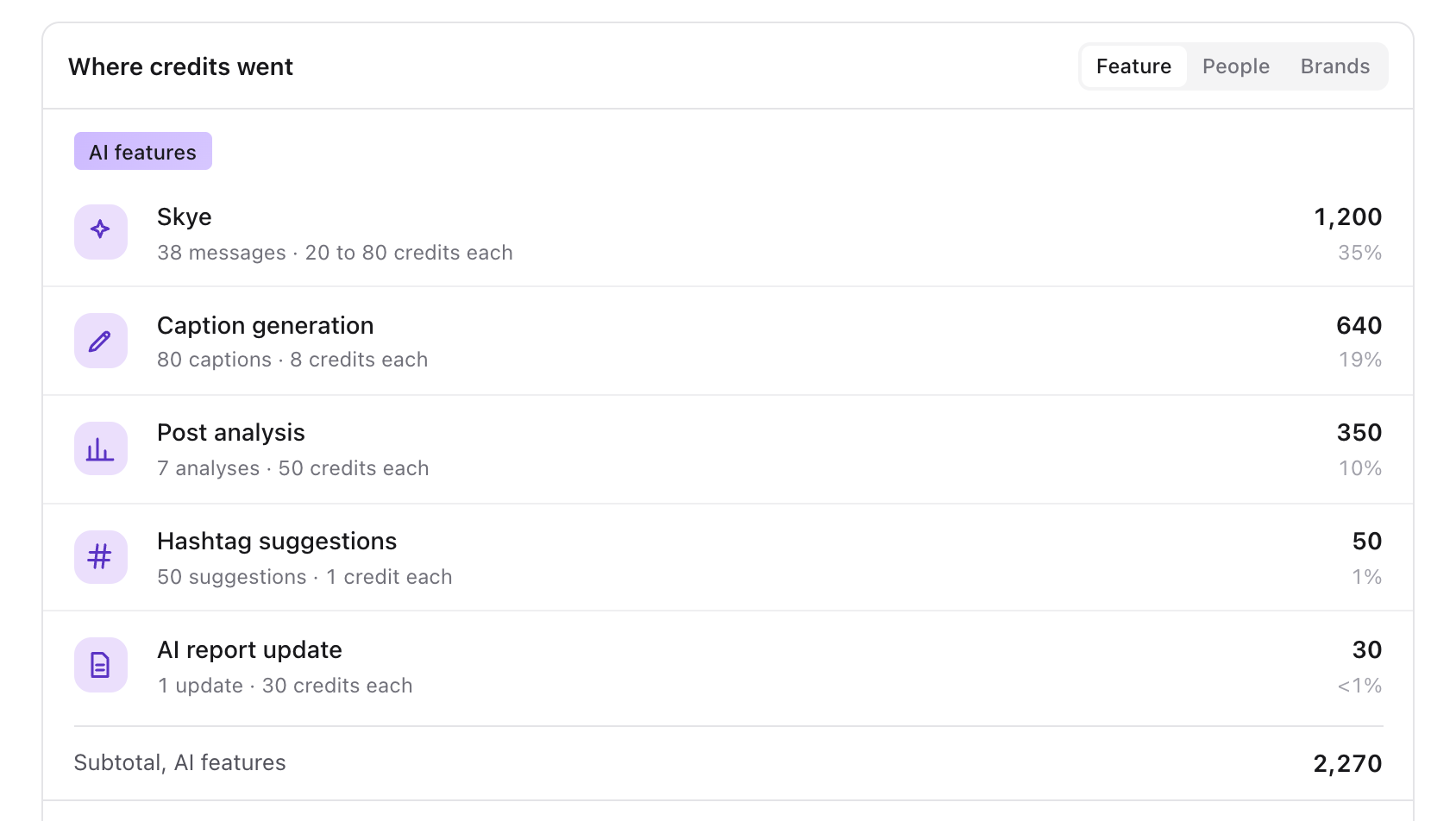
For example, each Draft with Skye reply in Inbox uses 10 credits and shows as Inbox reply draft in your usage. See View and reply to conversations in Inbox.
Each Skye message uses 20, 40 or 80 credits depending on how much it needs to read, and creating an image uses 120 credits. Talking with Skye and dictation add no extra credits beyond the messages themselves. See What Skye can help you do.
Credits for X
X charges for every post and every stats read, so posting to X and X stats use credits from your workspace's balance, the same credits that pay for AI features.
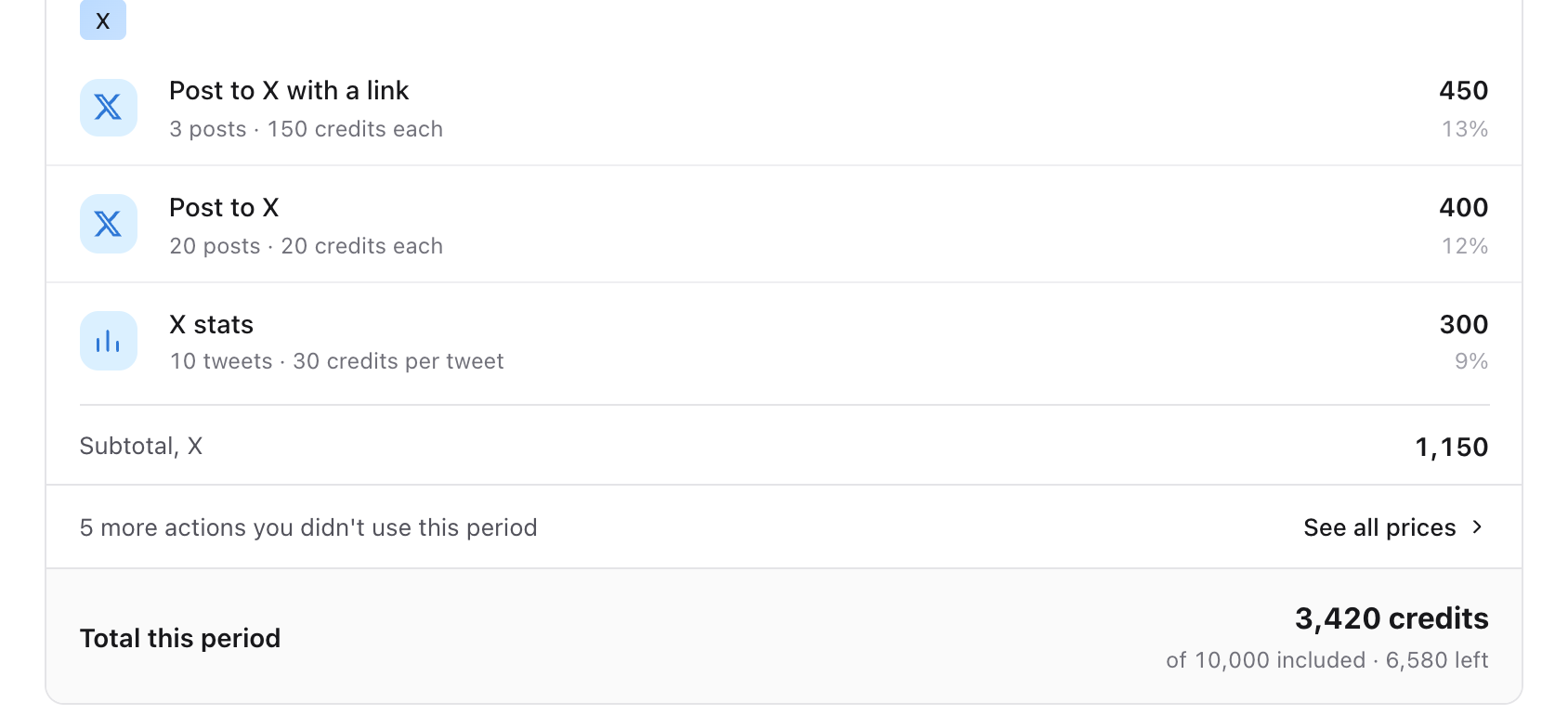
- Post to X: 20 credits.
- Post to X with a link: 150 credits, because X charges more for a post with a link.
- X stats: 30 credits per tweet, charged once.
X stats are off by default. To see impressions and engagement for an X account's posts, turn on the X stats switch on that account's card in Channels. Each tweet is charged once, and its stats update for its first 7 days. Tweets posted directly on X count too. Turn the switch off at any time to stop the charges; stats already collected stay.
If the workspace does not have enough credits, Sequence holds back the X post and shows the reason before anything is sent. If credits run out while X stats are on, the stats switch off and the workspace owners and admins are notified.
Find your balance and activity
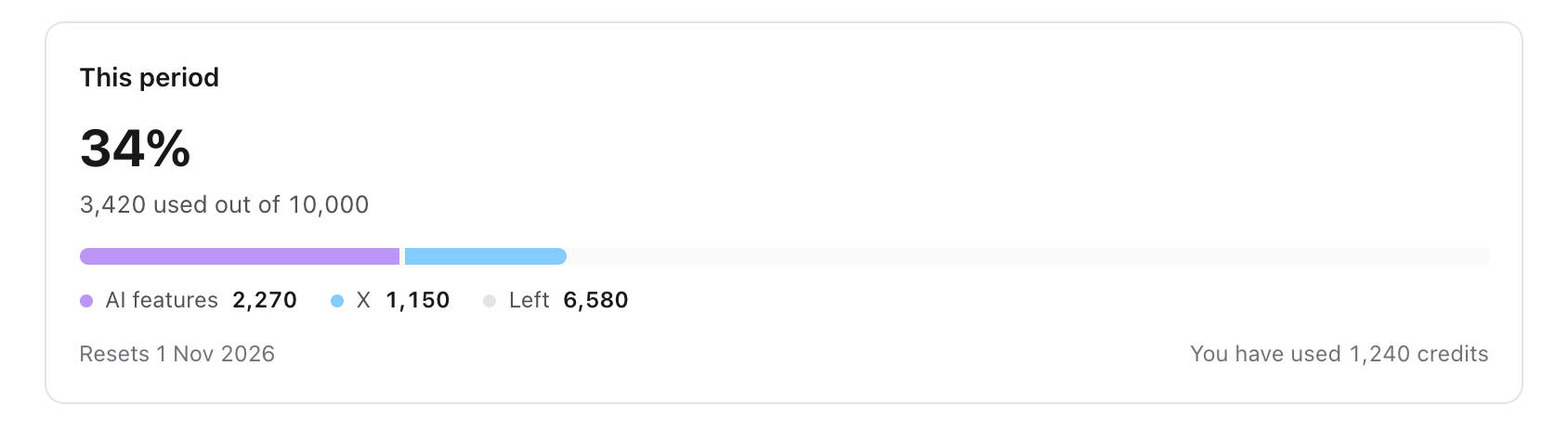
Open your profile menu, select Settings → Credit usage. Check This period for the current period and the usage information available to your role.
Under Usage details, use the period selector to inspect an earlier period. Usage breakdown can group workspace activity by Feature, People or Brands when you have the relevant access. Recent activity helps identify the action and date behind usage; select Show more when available. Download CSV provides the available usage export.
1. Check the workspace plan and usage
2. Retry with a focused request
3. Confirm the generation completed
Workspace-wide reporting and other people's activity depend on your role. If you only see your own activity, ask the workspace owner or administrator to review the wider usage rather than comparing your personal total with the workspace total.
Understand the allowance
The screen shows the allowance and reset information that applies to this workspace. Some workspaces have unlimited access; others have an included credit allowance. Check the displayed period rather than assuming credits reset on the first day of every calendar month.
Where available, the owner can choose Add credits and review Buy credits before checkout. One-time purchased credits are used after included credits and do not expire. Review the displayed pack and price before paying; a purchase in one workspace is not a purchase for every workspace you belong to.
Recover a failed generation
- 01Read the visible error and keep a copy of any useful output already returned.
- 02If the error concerns credits, check Credit usage in the same workspace. Ask the owner to review capacity if you cannot manage it yourself.
- 03If the action uses an attachment or imported post, check that its upload or media capture has finished. An unavailable input will not be fixed by rewriting the prompt alone.
- 04If the action is still running or queued, allow it to finish. If it has failed, retry the specific action once with the relevant input ready.
- 05If it fails again, record the feature, approximate time and exact error for support.
Do not assume a failed visible result consumed no credits. Check Recent activity before repeating a costly action, and ask support to investigate an unexpected charge with the corresponding activity details.
The result is wrong rather than failed
A completed generation can still need editing. Review facts, names and the intended audience before using it. If repeated outputs use the wrong brand context, update Brand Brain before generating again.
For a saved reference that cannot be analysed, use Fix an inspiration import to distinguish media capture from analysis.
Was this page helpful?
Related articles
Need more help with this?