
Sequence can show its menus, buttons and messages in English, Spanish, French, German, Brazilian Portuguese or Italian. Your language is saved to your account, so it follows you to every browser and device you sign in on, and each person in a workspace picks their own.
Change your language
- 01Open your profile menu and choose Settings.
- 02Go to Preferences, then find Language & region.
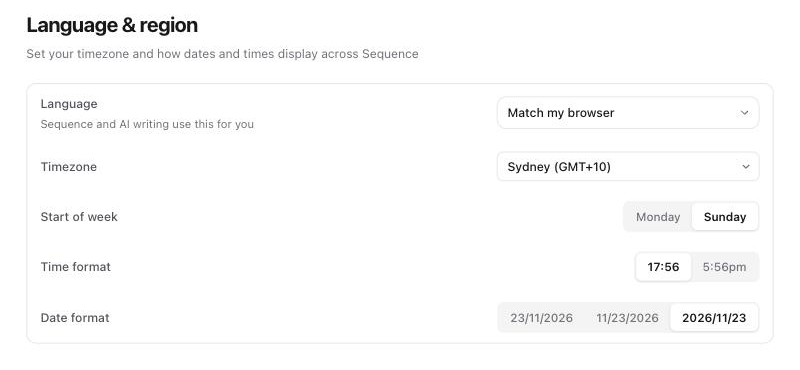
- 03Open the Language list and choose a language. Sequence saves it straight away and reloads in that language.
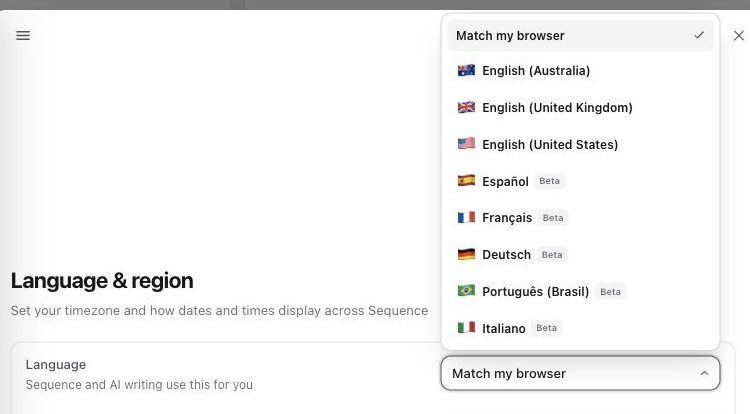
Match my browser uses your browser's language when Sequence has it, and English otherwise. English comes in Australian, British and American spelling.
What changes
- Menus, buttons, settings, messages and dates appear in your language.
- AI writing, such as Skye's replies and drafted captions, uses your language unless the brand has a Posting language set.
- Your posts, comments and Plans stay exactly as they were written. Changing your language never translates your content.
Your language and a brand's Posting language
Your language is personal. A brand's Posting language, in Brand settings, decides which language AI writes that brand's posts in for everyone. Leave it on Same as the writer's language and AI writes in the language of whoever is writing. Set a language there when a brand always posts in one language, whatever language your team uses Sequence in.
On the Sequence website
The website is available in the same languages. Use the language picker at the bottom of any page to switch. When you sign up from a translated page, your new account starts in that language, and you can change it at any time in Settings.
Languages in beta
Spanish, French, German, Brazilian Portuguese and Italian are in beta. If a word looks wrong or a sentence reads strangely, tell us through Help and feedback, Report a bug, and include the page and the words you saw. Some areas, such as emails and Help Centre articles, are still in English for now.
Was this page helpful?
Need more help with this?