
You can tag LinkedIn people and company pages in a LinkedIn caption, so the published post links to them and LinkedIn lets them know they were tagged.
What is a LinkedIn tag?
A tag is a name in your LinkedIn caption that links to that person's profile or that company's page. In Sequence a tagged name shows in bold in the caption and is listed under it. The name always comes from LinkedIn itself, because LinkedIn only links a tag when the name matches the profile or page exactly.
Tags are made for LinkedIn only. Your other platforms never receive them.
Tag someone in a LinkedIn caption
- 01Open the post and add a LinkedIn account to it on the Publish tab.
- 02Open the LinkedIn tab. Tagging is not available in Global Settings.
- 03In the caption, type @ at the start of a word. Typing in the LinkedIn caption switches on Customise for LinkedIn, so your other platforms keep their own caption.
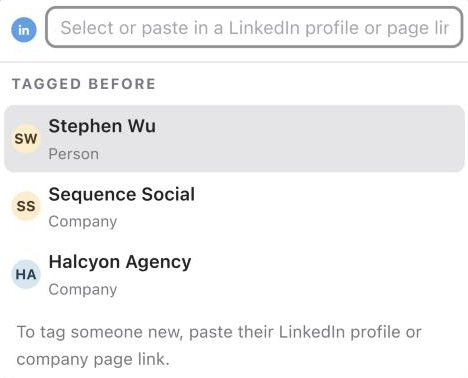
- 04A menu opens at your cursor. Under Tagged before you will see people and companies this brand has tagged before. Type to filter the list, then click a name or press Enter.
- 05To tag someone new, paste their LinkedIn profile link (linkedin.com/in/...) or company page link (linkedin.com/company/...) into the box that says Select or paste in a LinkedIn profile or page link. Sequence checks the link with LinkedIn and shows their LinkedIn name, marked Person or Company. Click the row or press Enter to tag them.
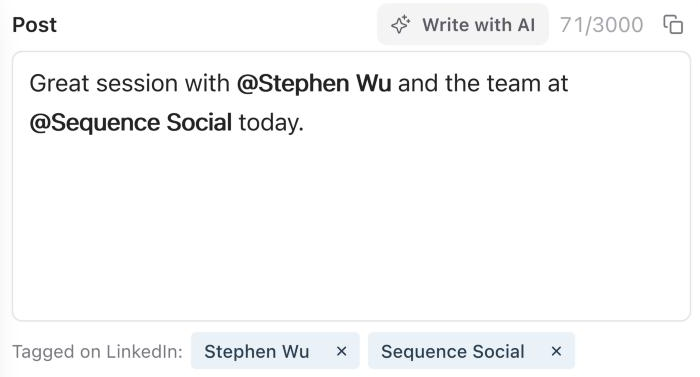
The tagged name appears in bold in the caption, and in the Tagged on LinkedIn: row under the caption.
Change or remove a tag
- Click a bold name in the caption, or its chip in the Tagged on LinkedIn: row, to open the tag menu. Pick or paste someone else to change the tag, or choose Remove tag.
- Click the x on a chip to untag that person or company everywhere in the caption. The words stay in your caption, without the @.
- If you edit the text of a tagged name, it stops being a tag and is no longer bold. Tag it again if you still want it linked.
What LinkedIn allows
These limits come from LinkedIn, not Sequence.
- Company pages can always be tagged.
- To tag a person, the LinkedIn account you are posting from must manage at least one LinkedIn company page.
- Some profiles cannot be tagged at all. If LinkedIn does not share a profile's name, Sequence tells you, and you can tag them on LinkedIn after the post is live.
- LinkedIn does not share profile photos, so tagged people and companies show as initials in Sequence.
Other platforms, edits and share links
- Instagram, X and Threads do not receive LinkedIn tags. To tag someone there, type their @username in that platform's own caption.
- If you edit a LinkedIn post after it is published, its tags are kept.
- Tagging is not available to people viewing a post through a share link.
Was this page helpful?
Related articles
Need more help with this?