
Use Trial Reel to publish an Instagram Reel to non-followers first. It lets you test a topic, opening or format before deciding whether to share the Reel with your followers.
Who can see a trial reel?
During the trial, the Reel does not appear on your profile's main grid or Reels tab for other people, or in your followers' feeds. Some followers may still come across it through a direct share or an audio, location or filter page. A trial reel is not private content.
Enable Trial Reel in Sequence
You need a connected Instagram Business or Creator account and permission to publish. Prepare one video and choose Reels / Shorts / TikTok as the post type.
- 01Open the content piece and choose Publish.
- 02Select the Instagram account as a publishing target, then open that account's settings.
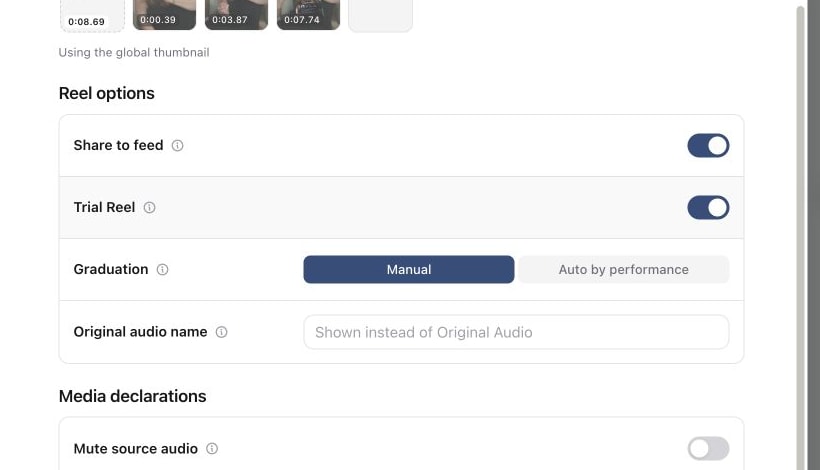
- 03Under Reel options, turn on Trial Reel.
- 04Choose a Graduation option: Manual or Auto by performance.
- 05Check the caption, video, cover and selected accounts. Resolve any blocking publishing messages, then schedule the post or publish it immediately.
The Trial Reel setting applies to Instagram. If the content also targets other platforms, review their settings separately.
1. Open Publish and select the Instagram account
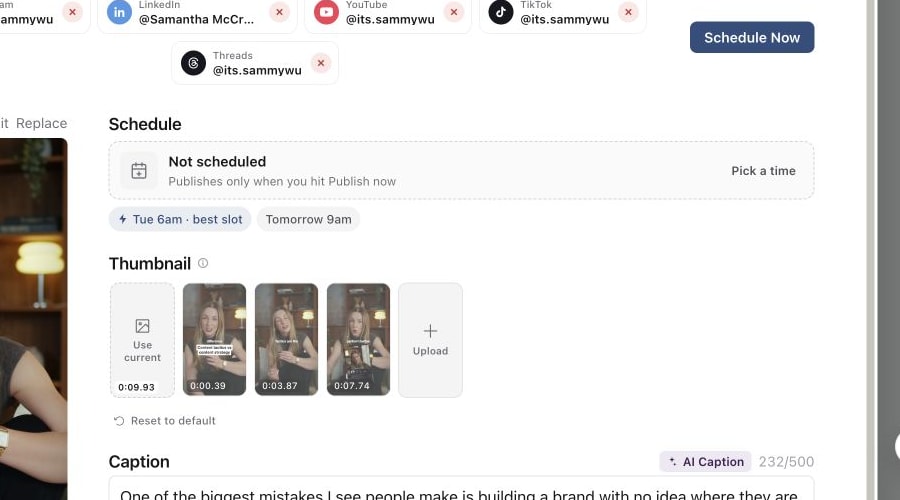
2. Open Reel options
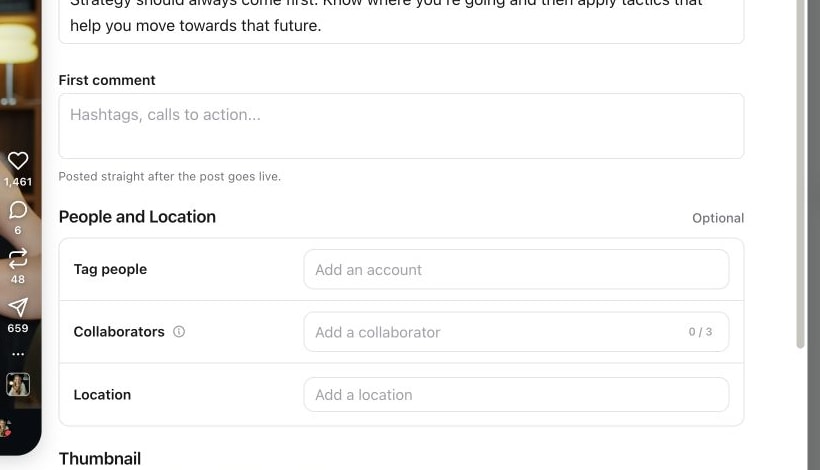
3. Turn on Trial Reel
4. Choose Auto by performance when required
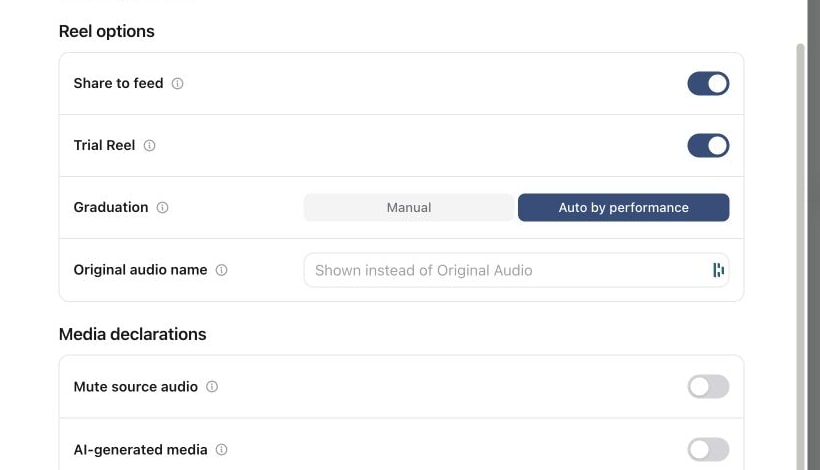
Choose how the Reel reaches followers
Manual
This is the default when you enable Trial Reel. You decide when to share the Reel more widely. After publishing, open the trial reel in the Instagram app and use Share with everyone when you are ready.
Auto by performance
Instagram can share the Reel with your followers automatically if it performs well with non-followers. Instagram makes that decision; selecting this option does not guarantee wider distribution.
Instagram says automatic sharing considers views received during the first 72 hours. That is a performance assessment window, not a fixed publication time or a requirement to wait before manually sharing.
Review the trial in Instagram
Open your Instagram profile to find your trial reel. Instagram says initial engagement metrics, including views, likes, comments and shares, are available approximately 24 hours after sharing. Review those results before deciding whether to share with everyone.
If Trial Reel is missing
Check that the post type is Reels / Shorts / TikTok and that you have opened the Instagram account's settings in Publish. The control is not available for photo posts, carousels or Stories. Graduation appears after you turn on Trial Reel.
If the post is already scheduled, its publishing content is locked. Follow the guide to editing scheduled posts before changing its settings.
If Instagram rejects the post, read the message for that publishing target and resolve the stated account or media issue before retrying.
Further reading
See Instagram's explanation of trial reels for audience behaviour and insights, and Zernio's Instagram documentation for its Trial Reels support.
Was this page helpful?
Related articles
- Targets and post typesChoose a post format and the exact accounts that should receive it, then check their target states.
- Schedule or publish nowConfirm a future schedule or publish immediately, then check delivery for each selected account.
- Fix failed publishingIdentify a failed account, correct its error and retry it without resubmitting successful destinations.
Need more help with this?