
Use this reference to choose a post type that every selected destination can accept. Sequence checks each connected account separately and shows destination-specific validation before scheduling.
A file that uploads successfully to Media is not automatically valid for every social platform. Upload limits, supported post types and publishing limits are separate.
Formats available in Sequence
Reels / Shorts / TikTok is Sequence's shared short-video post type. Each platform delivers it in its own supported short-video format.
| Platform | Formats available in Sequence |
|---|---|
| Short video, Photo, Carousel, Story | |
| Short video, Long Form Video, Photo, Carousel, Story, Text Only | |
| Short video, Long Form Video, Photo, Carousel, Text Only | |
| YouTube | Short video, Long Form Video |
| TikTok | Short video, Long Form Video, Photo, Carousel |
| Threads | Short video, Long Form Video, Photo, Carousel, Text Only |
| X | Short video, Long Form Video, Photo, Carousel, Text Only |
| Short video, Long Form Video, Photo |
These choices describe publishing support in Sequence. They do not mean every platform has the same Inbox, analytics or advertising features.
Choose the intended post format
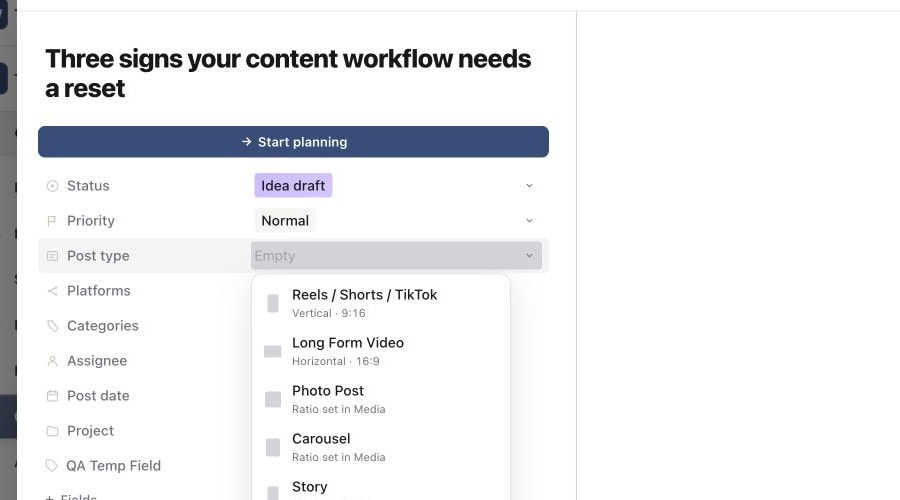
Use a reliable starting size
These are practical starting sizes for new creative. They are not a substitute for the validation shown on each selected destination.
| Post type | Starting size | Guidance |
|---|---|---|
| Reels / Shorts / TikTok | 1080 × 1920, 9:16 | Use one vertical video. |
| Long Form Video | 1920 × 1080, 16:9 | Use one horizontal video. |
| Photo Post | 1080 × 1080, 1:1 or 1080 × 1350, 4:5 | Use a square or portrait image when the destination supports it. |
| Carousel | 1080 × 1350, 4:5 or 1080 × 1080, 1:1 | Keep every slide at the same ratio. |
| Story | 1080 × 1920, 9:16 | Use one vertical image or video. |
| Text Only | No media | Write a caption and choose a platform that supports text-only posts. |
Instagram feed photos and carousel media must stay between 4:5 portrait and 1.91:1 landscape. YouTube Shorts must be square or vertical. A landscape upload is treated as a regular YouTube video.
Media count and video duration limits
| Platform | Current Sequence limits |
|---|---|
| Up to 10 carousel items; Stories use one item. Videos must be 3 seconds to 15 minutes. Media is required, and Reels require one video. | |
| Up to 10 images or GIFs in a carousel; Stories use one item. Video posts must be 1 second to 4 hours, and Story videos 2 minutes or shorter. Do not mix photos and video. Text-only posts are supported. | |
| Up to 20 images or GIFs, or one document. Videos must be 3 seconds to 30 minutes. Do not mix a document, photos and video. Text-only posts are supported. | |
| YouTube | Exactly one video is required. Shorts must be 3 minutes or shorter and square or vertical. Other videos can be up to 12 hours. Photo and carousel posts are not supported. |
| TikTok | Up to 35 images in a photo carousel, or one video from 3 seconds to 10 minutes. Media is required. Do not mix photos and video. |
| Threads | Up to 10 images or GIFs, or one video up to 5 minutes. Do not mix photos and video. Text-only posts are supported. |
| X | Up to 4 images, one GIF or one video from 0.5 to 140 seconds. Do not mix media types. Text-only posts are supported. |
| Exactly one image or one video from 4 seconds to 15 minutes. Media and a Pinterest board are required. |
Upload formats and automatic preparation
Sequence accepts common image and video source formats. Images can be uploaded as JPG/JPEG, PNG, WebP or AVIF, with GIF available where the destination supports it. Supported video uploads include MP4, MPEG/MPG, MOV, AVI, WebM and M4V.
Image sources are limited to 100 MB and video uploads to 10 GB. A platform may require a smaller publish-ready file. Sequence prepares a compatible image or video when it can do so without changing the content, then shows Preparing media while that work is underway. Wait for preparation to finish before publishing.
For the complete upload workflow and document formats, see upload media and check supported formats.
Check each selected destination
In Publish, select the exact connected accounts that should receive the post. Two accounts on the same platform are separate destinations.
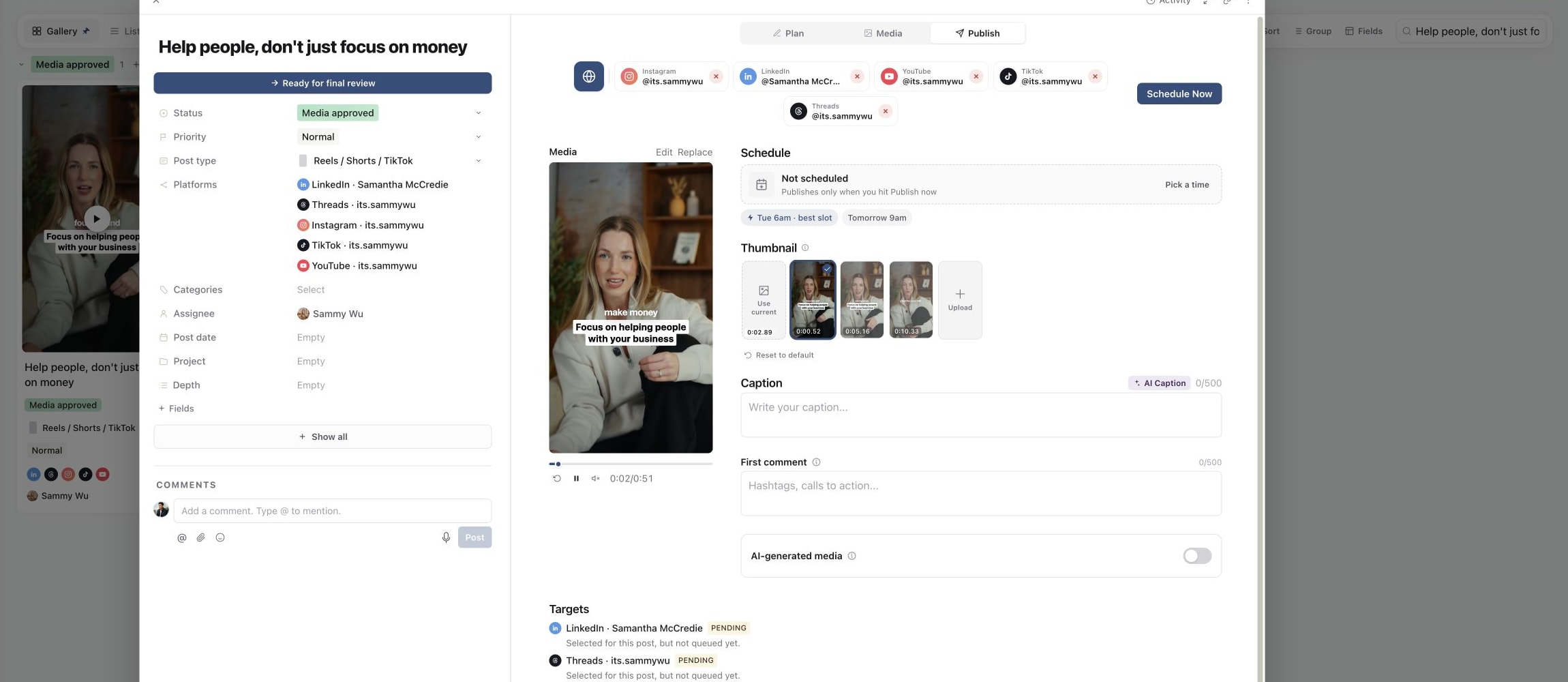
Open each account-specific view and resolve its validation messages before scheduling. See connect a social account and choose targets and a post type for the full workflow.
Resolve validation before scheduling
- Use video for a video post type and suitable images for Photo Post or Carousel.
- Check the media count, dimensions, aspect ratio, duration and any platform-specific fields shown for each account.
- Review captions separately. A caption that fits one platform may be too long on another.
- YouTube titles must stay within the displayed limit and cannot contain angle brackets.
- Pinterest requires a board. A destination link, when supplied, must be a valid HTTPS URL.
- Wait for media processing or preparation to finish before treating the post as ready.
Use prepare and preview a post for the final check. If one destination fails after submission, correct only that target and follow fix a failed publishing target.
If an account or format is unavailable
Check the active brand, the account connection and the selected post type. A format available inside a social app is not necessarily available through its publishing connection. Changing a content status cannot add platform support or repair an expired connection.
Was this page helpful?
Related articles
- Fix failed publishingIdentify a failed account, correct its error and retry it without resubmitting successful destinations.
- Prepare and preview a postReview media, captions, destinations and required platform settings before submitting a post.
- Upload media and formatsUpload creative, check file formats and sizes, and prepare the correct version for review and publishing.
- Targets and post typesChoose a post format and the exact accounts that should receive it, then check their target states.
- Connect a social accountConnect the correct social profile to a brand and check it is available for your posts.
Need more help with this?