
Add source material when Skye needs exact context that isn't already in Sequence. The message box takes photos, documents and dictation.
Attach files or images
Select Add photos or files (the paperclip) in the message box. Skye accepts JPG, JPEG, PNG, WebP, PDF and DOCX files. You can attach up to five files per message, up to 10 MB each and 25 MB in total.
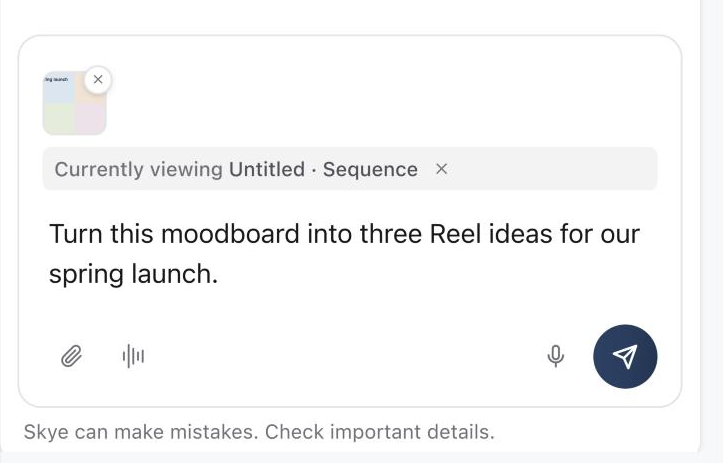
Wait until every attachment is ready before sending. Select × on an attachment to remove it. Skye reads up to 8,000 characters of text from each document and 16,000 characters across a message, so point it to the section that matters.
Dictate a message
Select Voice input (the microphone) and allow microphone access if your browser asks. Speak your request, then select Stop and transcribe, or Cancel recording to discard it. Your words appear in the message box, where you can fix names, figures and punctuation before sending.
To have a spoken conversation instead, use Talk with Skye. See Talk with Skye out loud.
Work with transcripts
Tell Skye what to do with a transcript, such as extract a hook, build a filming plan or draft a caption. Identify speakers and mark the facts that must stay exact. For long material, attach the source and ask about one section or outcome at a time.
Skye can also read the transcript of a video that's already in a post. Ask about what's said in the video. If it hasn't been transcribed yet, Skye asks you to allow a transcription first, then answers once it's ready.
Don't attach passwords, access tokens or material the active brand shouldn't keep.
Was this page helpful?
Related articles
- What Skye can doSkye is the AI assistant beside every page in Sequence. Ask about your content, draft and rewrite Plans, research the web and review every change before it's applied.
- Credits and failuresSee what costs credits, including AI features, X posts and X stats, review usage, and recover a failed generation.
Need more help with this?