
Skye can look things up on the web when an answer needs current information from outside Sequence, such as platform changes, posting trends or best practice.
Ask a research question
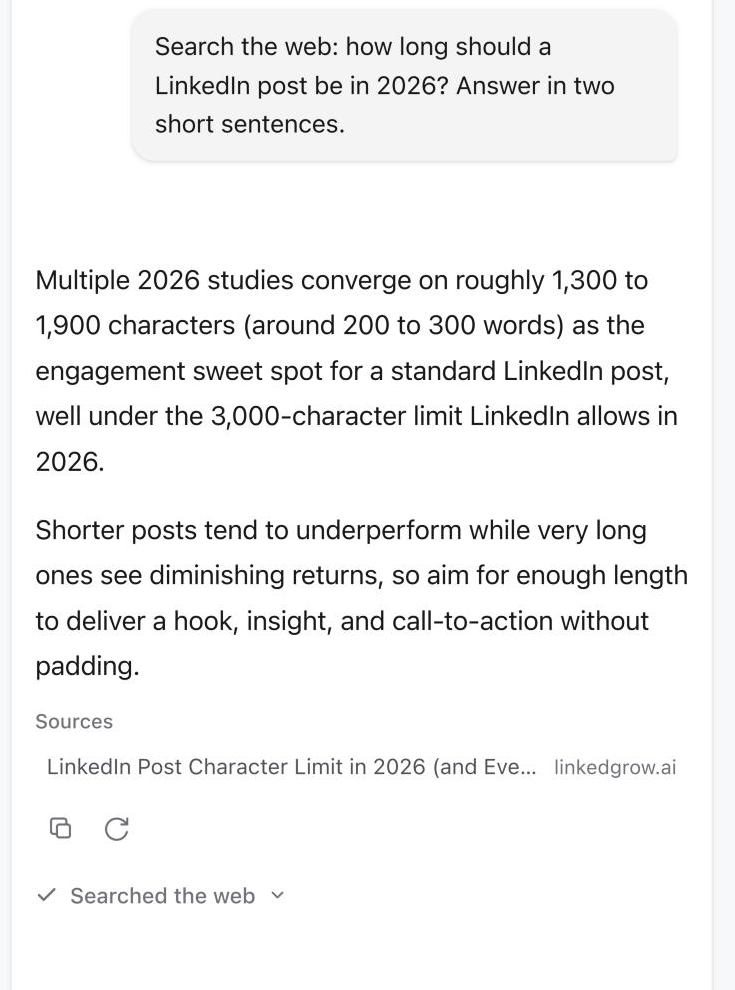
Ask in your own words. Skye decides when a search will help, or you can say search the web to make sure it does. While it works, the activity line shows Searching the web… or Reading a page…, then Searched the web when it's done.
Check the sources
The pages Skye used are listed under Sources below the reply, with each page's title and website. Select one to open it in a new tab and check the details yourself. Sources stay with the chat, so they're still there when you come back to it.
Good to know
- For each message, Skye runs up to three searches and reads up to three pages, with no more than five web lookups in total.
- Skye treats what it reads on the web as reference material only. It doesn't follow instructions it finds on a page.
- A message that searches the web reads more, so it can use more credits than a quick question. See Understand AI credits and troubleshoot a failed generation.
- Web pages can be wrong or out of date. Check important facts against the source before you publish.
Was this page helpful?
Related articles
- What Skye can doSkye is the AI assistant beside every page in Sequence. Ask about your content, draft and rewrite Plans, research the web and review every change before it's applied.
- Ask about your content planAsk Skye a focused question about the active brand to find pipeline gaps, deadlines, owners and next steps.
- AI credits and failuresReview AI credit usage and activity, understand the allowance and recover a failed generation without repeated attempts.
Need more help with this?