
Use bulk actions for a deliberate change to several pieces, or Duplicate when you need a separate piece based on existing work. Review the selection first: a visible filter can hide other content, and scheduled or published pieces have additional restrictions.
Select and update a batch
- 01Open Content in a view with selectable cards, rows or tiles, including Grid view.
- 02Use the selection control on each piece. Check the selected count in the toolbar.
- 03Choose Status, Priority, Assignee, Post type, Category or Platforms for the field you want to change.
- 04Open More for additional options, including Date, Project, Custom fields, Duplicate and Copy links.
- 05Check the completion message and inspect a representative piece. Clear the selection when finished.
1. Select the content pieces to update

2. Apply one assignee to the selection
3. Move the selection into one project
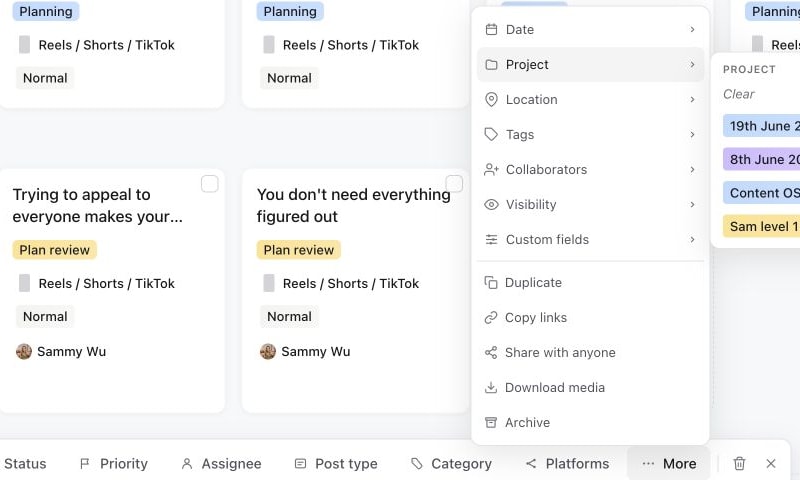
For example, select the pieces from one filming session, assign the editor, and use More → Project to associate the campaign. Do not assume every piece in a mixed-status selection can accept the same change. If only some updates succeed, inspect the reported failures before retrying them.
Duplicate an unfinished piece
Select the piece and choose More → Duplicate, or use Duplicate in its planner context menu. A normal duplicate starts at Idea draft and clears the post time and published link.
The copy carries reusable material such as its Plan, captions, media, thumbnail information and assignees. Open it and check the title, project association, account targets, custom values and platform settings before using it. Duplication is not a confirmation to publish, and a copied campaign association should always be checked.
Move or copy to another brand
To send the selection to another brand in the same workspace, choose More, then Move or copy to brand… Copy leaves the originals where they are. Move takes them across with their comments and history. Move or copy posts to another brand explains the match step and which posts can't move.
Reuse a published post
Published content cannot simply be dragged back into production as if it had never gone live. Use Post again in the planner where offered, or Duplicate in the published piece's banner. A repost copy opens at Media approved so you can prepare it in Publish. Its old published URL and scheduled time are cleared.
Review the new caption, creative, selected accounts and time, then submit the new schedule. The original remains the record of the earlier publication.
Review and deletion actions
Use Send for approval to choose reviewers for a batch; selecting a review status is not a replacement for that request. Scheduled pieces may require cancellation before an output change. Published targets remain locked even if another target failed.
Delete selected posts moves eligible pieces to the Bin after confirmation. Check the count and any cancellation error before leaving. See delete and restore, approval requests and published locks.
Was this page helpful?
Related articles
- Send for approvalChoose the review step and reviewer for one or multiple posts, use Default per post for mixed batches and confirm the approval request.
- Edit scheduled contentUnschedule before changing queued creative, understand published locks and create a separate repost safely.
- Move or copy to a brandSend posts or a whole project to another brand in your workspace, and choose what happens to the statuses, fields and people it doesn't have.
Need more help with this?