
Content has five ways to view the same content pieces. Save the view mode, layout, visible fields, filters, sorting and grouping so you can return to the same setup or share it with your team.
Choose a view for the task
Open Content in the correct brand, then choose Board, List, Calendar, Gallery or Grid from the toolbar. Changes to a piece appear in every view because each view points to the same content.
Board follows workflow stages. List supports compact review and editing. Calendar organises dated content. Gallery gives creative more space. Grid previews the arrangement for a selected social account.
Save your setup
1. Choose a view and adjust Layout, Fields, Filter, Sort and Group.
2. Open Views and select Save as new view.
3. Name the view, then choose who it is for: Just me, Brand or Workspace.
4. Open the saved view whenever you need that setup again. You can update it, save a separate copy or discard unsaved changes.
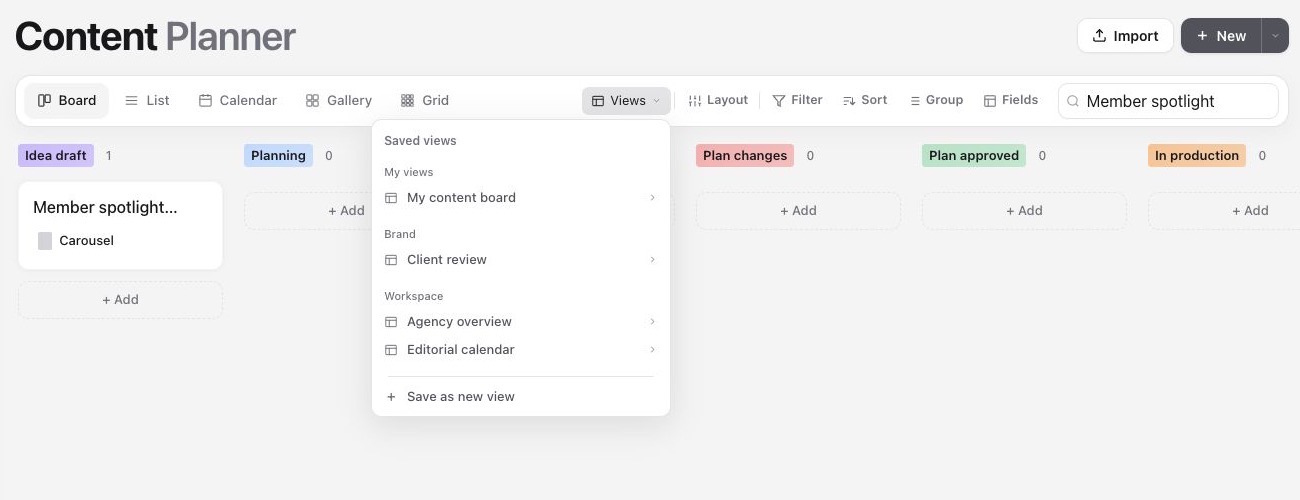
Choose who can use a view
Just me creates a personal view. Any user can save personal views and choose one as their own default.
Brand shares the view inside the current brand. Brand admins and workspace admins can save brand views and set the brand default.
Workspace shares the view across brands in the workspace. Workspace admins can save workspace views and set the workspace default.
A workspace view that relies on a brand-specific custom field may need that field mapped before it can be used in another brand. Custom fields stay owned by their brand.
Use defaults without losing flexibility
A shared default gives teammates and clients the same starting setup. You can follow the shared default or choose a personal default instead. Changing a view or its default never changes the content pieces themselves.
Use a copied view link when you want someone to open the same saved setup. Their access to the brand or workspace still controls what they can see.
Was this page helpful?
Related articles
Need more help with this?