10 Best All-in-One Social Media Management Software in 2026
Ten all-in-one social media management tools scored against six jobs: plan, approve, publish, inbox, DM automation and reports, with a worked cost for a five-client agency.
Most social media tools call themselves all-in-one. Here is what the term should cover, how ten popular tools score against it, and what a five-client agency would actually pay for each.
The best all-in-one social media management software covers six jobs in one place: planning, client approval, publishing, a shared inbox, DM automation, and reporting. Most tools on this list do four or five of those well. Very few also handle video review, which is where a lot of agency time actually goes.
Below, we define the term, score ten tools against it, and price the same five-client agency setup in each. Prices were checked on each vendor's own site in October 2026, with sources linked.
What does all-in-one social media management mean?
All-in-one is a marketing phrase, so it helps to pin it down. For this roundup, a tool earns the label when a team can take a post from idea to report without leaving it. That means six jobs:
- Plan: a calendar or board where briefs, captions and media live together, with statuses and owners.
- Approve: internal review plus a way for clients to approve, ideally without buying them a seat.
- Publish: native scheduling to the networks you actually use, with each network's own options.
- Inbox: comments and DMs from every account in one shared queue, with assignment.
- DM automation: comment-to-DM and keyword replies, so a launch post can deliver a link or collect an email.
- Analytics and reports: performance data plus a report you can send a client on a schedule.
End-to-end social media management is the same idea described as a workflow rather than a feature list. The work moves from brief to draft, to review, to scheduled post, to published post, to replies, to a report, and nobody copies it between apps along the way. A tool can tick every box and still fail if video feedback lives in a separate app and someone re-uploads the approved cut.
If clients mostly approve video, add a seventh check: timecoded comments on the actual file. We scored it separately.
How we scored the ten tools
Each cell reflects what the vendor's own pricing page or help centre says, on the plan named. ✅ means documented on that plan. ◐ means partial, conditional or an add-on. ❌ means the vendor's page does not list it. "Not documented" means we found no first-party evidence either way, which is different from a confirmed no. Fit notes are editorial judgement, not benchmarks.
The all-in-one scorecard
| Tool | Plan | Client approval | Publish | Inbox | DM automation | Reports | Video review |
|---|---|---|---|---|---|---|---|
| Sequence | ✅ Free | ✅ Pro, guests approve from a link | ✅ 8 networks | ✅ Pro | ✅ Pro, IG and FB (Beta) | ✅ Pro, scheduled | ✅ Timecoded comments and drawing |
| Hootsuite | ✅ | ◐ Advanced; external approvers not confirmed | ✅ | ✅ All plans | ✅ All plans, IG comment-to-DM | ✅ Custom, Professional+ | Not documented |
| Sprout Social | ✅ | ◐ Advanced, max 3 external approvers | ✅ | ✅ Standard+ | ◐ Bot Builder chatbots | ✅ All plans | Not documented |
| Agorapulse | ✅ | ✅ Advanced, shared calendars without an account | ✅ | ✅ All plans | ❌ Moderation rules only | ✅ Branded export, all plans | Not documented |
| Sendible | ✅ | ✅ Plus+, client dashboards | ✅ | ✅ Plan not confirmed | ❌ Not listed | ✅ Branded, Premium+ | Not documented |
| SocialPilot | ✅ | ✅ Premium+, unlimited client seats | ✅ | ✅ Standard+ | ✅ Standard+ | ✅ White label, Premium+ | Not documented |
| Vista Social | ✅ | ✅ Advanced+ | ✅ | ✅ All plans | ✅ All plans | ✅ Custom, Advanced | Not documented |
| Buffer | ✅ | ◐ Team, clients join as users | ✅ | ◐ Comments; DMs not confirmed | ❌ Reply suggestions only | ✅ Branded, Team | Not documented |
| Later | ✅ Visual planner | ✅ Growth+; seat model not confirmed | ✅ | ✅ Growth+ | ❌ Not on pricing page | ✅ Shareable report | Not documented |
| Metricool | ✅ | ✅ Advanced | ✅ | ✅ Paid plans, most networks | ✅ Flows, paid plans | ✅ PDF and PPT, Starter+ | Not documented |
Key: ✅ documented on the plan named. ◐ partial, conditional or add-on. ❌ not listed by the vendor. Not documented: no first-party evidence found. Checked October 2026.
The 10 best all-in-one social media management tools, reviewed
1. Sequence: best for agencies and video-led teams that want the whole workflow
Sequence is an all-in-one social media management platform built around the content itself. Each post has a Plan for the brief and script, media review with timecoded comments and drawing, review stages, and publishing to Instagram, Facebook, LinkedIn, YouTube, TikTok, Threads, X and Pinterest. On Pro, clients can comment, draw on a video at a timestamp and approve from a share link without creating an account. The shared inbox, DM Flows for Instagram and Facebook comment-to-DM, and scheduled reports are also Pro.
Pricing is per brand, not per person. There is a Free plan (1 brand, 1 user, 1 account, 5 queued posts per channel), and Pro starts at US$49 a month for one brand, graduated per brand, with unlimited users and 5 accounts per brand. Yearly costs 10 times the monthly price. See current pricing.
Where it falls short: no social listening, competitor benchmarking or link-in-bio page, no Bluesky or Google Business Profile publishing, DM Flows is still in Beta, and ads analytics covers Meta only. If listening is central to your work, look at Sprout Social or Hootsuite.
2. Hootsuite: best for large teams that want automation inside a big suite
Hootsuite Social OS covers almost every column, with client approval the main question mark. Instagram comment-to-DM automation is built into all plans, and the inbox is on every plan. Approvals start on Advanced at US$399 per user a month billed annually, and Hootsuite does not publish monthly prices. We could not confirm that clients can approve without a seat. Hootsuite plans. Our Sequence vs Hootsuite comparison goes deeper.
3. Sprout Social: best for listening and customer care at scale
Sprout is strong on reporting, inbox and customer care, and Premium Analytics is available as an add-on. Internal approval workflows start on Professional, but external client approvers need Advanced, US$499 per seat monthly or US$399 annually, and Sprout's help centre caps external approvers at three. That limit matters if each client has their own approver. Sprout pricing.
4. Agorapulse: best inbox and reporting for community-heavy accounts
Agorapulse has an inbox for comments, DMs and reviews on every plan, plus branded report exports on all plans. On Advanced (US$199 per user monthly, US$149 annually), shared calendars let outside reviewers approve or reject without an account, up to five calendars. Its automation rules moderate, label and assign but do not send DMs. Agorapulse pricing.
5. Sendible: best for client dashboards and white-label software
Sendible includes unlimited users on every plan and gives clients dashboards to preview and approve from Plus (US$99 a month). Custom branded reports start on Premium, and a white-label app is a paid add-on on Elite and Enterprise. DM automation is not listed. Sendible pricing.
6. SocialPilot: best value for agencies needing white-label reports
SocialPilot's Premium plan, US$100 a month, includes 20 accounts, 6 users, unlimited client seats, client approvals and white-label reports. Its inbox automation handles Instagram comment-to-DM from Standard. For a pure feature-per-dollar count, it is hard to beat. SocialPilot pricing.
7. Vista Social: best for broad network coverage with DM automation
Vista Social publishes to more networks than most, including Reddit, Snapchat, Tumblr and Bluesky, and its DM automations are on all plans. Client approvals and custom reports start on Advanced at US$199 a month, white-label reports on Scale. X is a US$29 monthly add-on. Vista Social pricing.
8. Buffer: best for small teams that want simple publishing
Buffer is the simplest tool here. The Team plan adds unlimited users, approvals and branded reports at US$12 per channel monthly, dropping to US$4 per channel from the eleventh. The community inbox covers comments; we could not confirm DMs, and there is no DM automation. Buffer pricing.
9. Later: best for visual Instagram and TikTok planning
Later's visual planner and link in bio remain its strengths. Growth (US$50 a month) adds the social inbox and internal and external approvals, with 2 social sets and 2 users; extra sets cost US$15 and extra users US$5. DM automation is not on the pricing page. Later pricing.
10. Metricool: best for analytics on a budget
Metricool leads with measurement: unlimited history on paid plans and PDF or PowerPoint reports from Starter. Advanced, US$67 a month for up to 15 brands, adds team and client management and post approvals. Flows handles Instagram comment-to-DM on paid plans, and LinkedIn publishing is paid only. Metricool pricing.
What a 5-client agency with 3 staff actually pays
Starting prices rarely buy the same setup, so here is one realistic setup priced in every tool: 5 clients, 4 profiles each (20 in total), 3 staff, client approval included, monthly billing where it is published. Prices were checked in October 2026 against the sources linked above.
| Tool | Plan that covers the setup | Monthly cost (USD) | What to check |
|---|---|---|---|
| Sequence | Pro, 5 brands | US$127, unlimited users | Inbox, DM Flows, reports, video review included |
| Metricool | Advanced (up to 15 brands) | US$67 | Seat model not confirmed; X is an add-on |
| SocialPilot | Premium | US$100 | Exactly 20 accounts; 6 users |
| Later | Growth + 3 sets + 1 user | US$100 | Scale (6 sets, 4 users) is US$110 |
| Buffer | Team, 20 channels | US$160 | No DM automation |
| Sendible | Premium | US$199 | Plus stops at 18 profiles |
| Vista Social | Advanced | US$199 | 30 profiles; user count unclear |
| Agorapulse | Advanced, 3 users | US$597 | Before any extra profiles |
| Hootsuite | Advanced, 3 users | US$1,197, billed annually | Monthly price not published |
| Sprout Social | Advanced, 3 seats | US$1,497 | Needed for external approvers, max 3 |
Sequence is not the cheapest line. Metricool, SocialPilot and Later come in lower, and if their plan covers your work, that is real money saved. The table does not show what you add on top. A team that reviews video in a separate tool pays for that too: Frame.io Pro is US$15 per member a month (Frame.io pricing), and neither Frame.io nor Filestage publishes to social. A tool without comment-to-DM may also mean a separate DM automation subscription, usually priced by contacts.
Per-seat suites also grow with every hire: two more staff adds about US$1,000 a month to the Sprout line. Our Hootsuite alternatives for small agencies guide has a worksheet for pricing your exact mix.
Two gaps most all-in-one tools still leave
Client approval without a paid seat
Clients rarely want another login. Check whether a reviewer can approve from a link or email, on which plan, and how many reviewers that covers. For a deeper look at what each tool lets clients review, see our client approval tools comparison.
Video review on the actual file
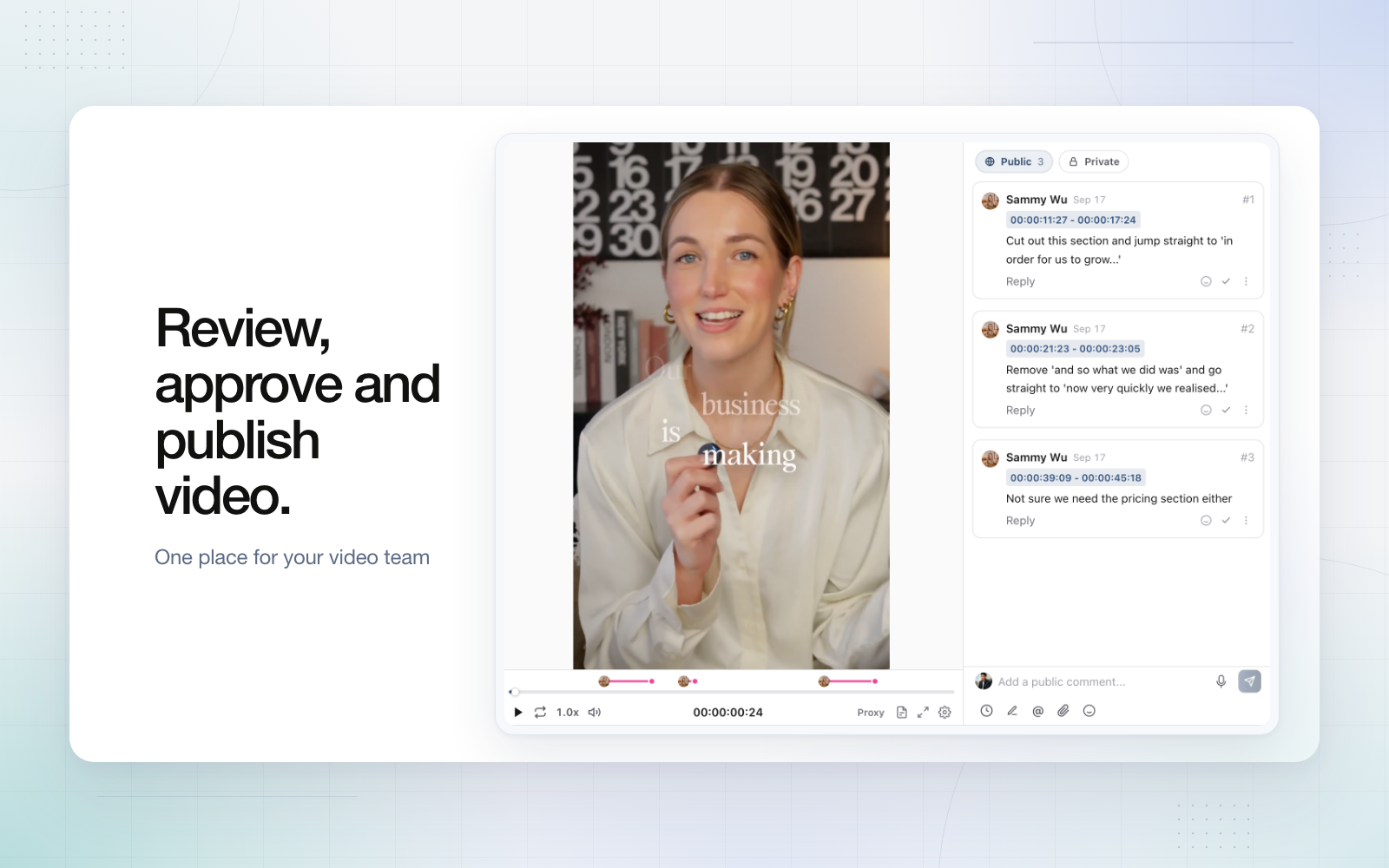
We found no first-party documentation of timecoded video comments in any scheduler on this list except Sequence, which keeps timestamped comments, drawn annotations and versions on each media file. That does not prove the others lack it, only that they do not document it. If most of your client feedback is "change the text at 0:12", test this before you buy. Video teams can read how this works on our video teams page.
How to choose
- Choose Sequence if clients approve scripts and video and you want the full workflow in one per-brand price on the eight networks it supports.
- Choose Sprout Social or Hootsuite if social listening, enterprise reporting or customer care volume is the core of the job, and per-seat pricing fits your budget.
- Choose SocialPilot or Sendible if white-label reports and client dashboards matter most.
- Choose Metricool if analytics depth and low cost lead, and approvals are light.
- Choose Later or Buffer if you mainly need a clean visual planner or simple publishing for a small team.
Shortlist two, then run the same client batch through both: one video, one carousel, one post that moves date after approval.
Frequently asked questions
What is the best all-in-one social media management software?
It depends on which of the six jobs carries most of your work. For agencies and video-led teams that want planning, client approval, publishing, inbox, DM automation and reports under one per-brand price, Sequence is a strong fit. For listening and enterprise customer care, Sprout Social and Hootsuite are stronger.
What does end-to-end social media management mean?
It means one tool carries a post from brief to report: planning, review, approval, scheduling, publishing, replies and reporting, without copying work between apps.
Is there a free all-in-one social media management tool?
Sequence, Buffer and Metricool have free plans, but none include the full set. Sequence Free covers planning, publishing, media review and 30 days of analytics for one brand; approvals, inbox, DM Flows and reports need Pro.
Which tools let clients approve without a paid seat?
Sequence (Pro share links), Agorapulse (Advanced shared calendars), Sendible (client dashboards) and SocialPilot (Premium client seats). Sprout allows up to three external approvers on Advanced.
Do all-in-one tools include Instagram DM automation?
Some do. Sequence, Hootsuite, SocialPilot, Vista Social and Metricool document Instagram comment-to-DM. Agorapulse, Sendible, Buffer and Later do not list it on their pricing pages.
Try it on one client
If the scorecard points to Sequence, the quickest test is one real client. Start a free Sequence workspace, invite the client to review one video post, and see whether the approval reaches publishing without a single re-upload.