Sequence vs Poppy AI: from saved inspiration to organised drafts
Compare Sequence’s Inspiration library and draft workflow with Poppy AI’s visual boards, plus a practical way to move references and scripts into Sequence.
Sequence turns a brand’s saved inspiration into drafts your team can produce, review and publish. Poppy AI suits people who prefer to research and write on a visual canvas.
We’ve had people ask how to move from Poppy to Sequence. Some tell us they prefer Sequence’s organisation to working through connected nodes on a board.
If you’re weighing up the same move, start with how you find references and turn them into posts.
Sequence vs Poppy AI: library or canvas?
Poppy: connect your research on a board
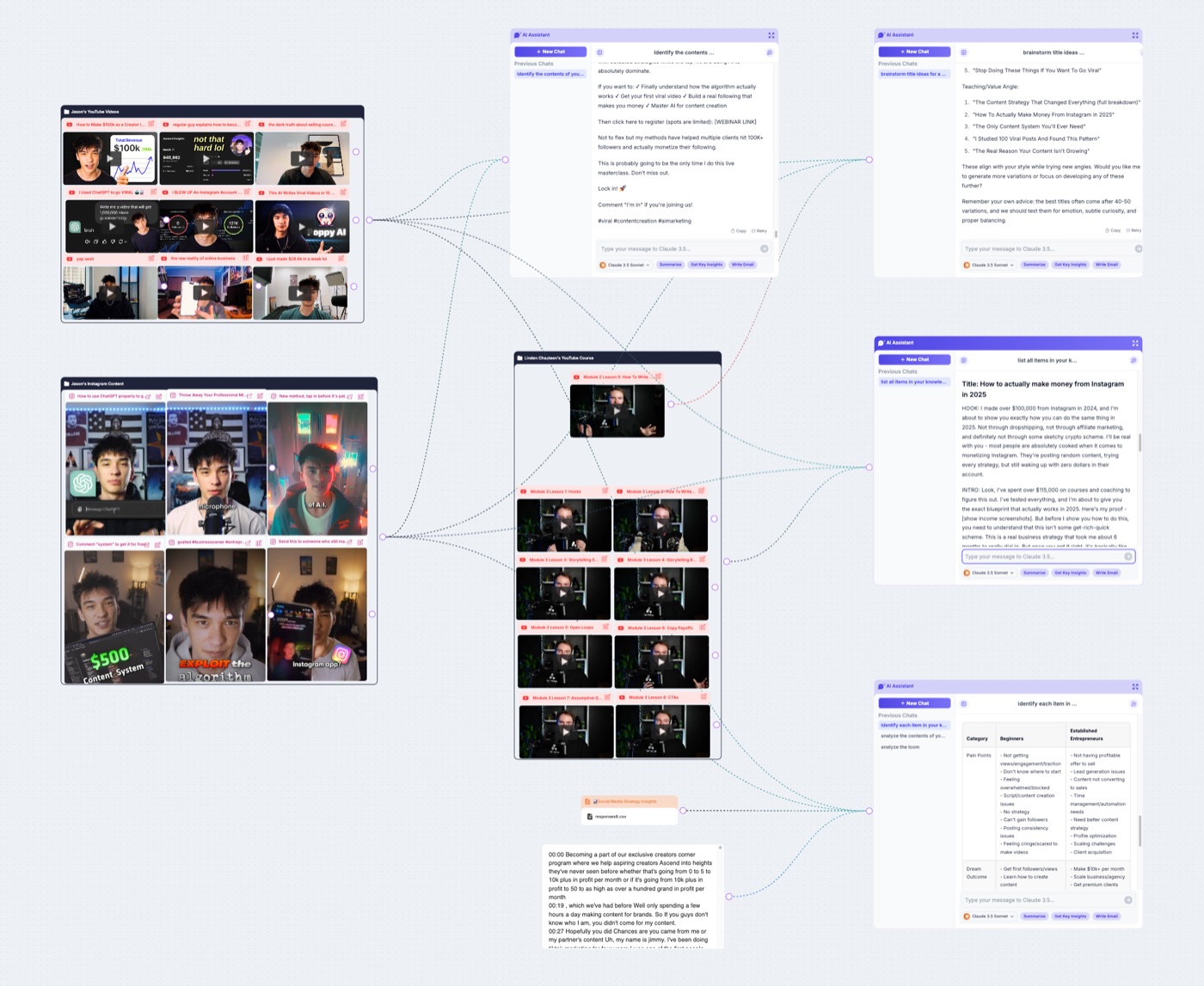
Poppy puts sources and AI chats on a visual board. Connect individual resources or groups to a chat to give it context.
It also gives you ways to organise that research:
- Groups keep related sources together.
- Folders organise your boards.
- Vaults reuse sources across boards, including linked text that stays in sync.
A canvas can help you see connections between customer research, a video, an offer and possible angles. Poppy’s board organisation guide explains how to arrange those sources.
Sequence: find references in a brand library
Sequence saves references to the active brand’s Inspiration library. You can:
- Group a campaign or theme in folders.
- Search hooks, creators and transcript phrases.
- Filter by platform or format.
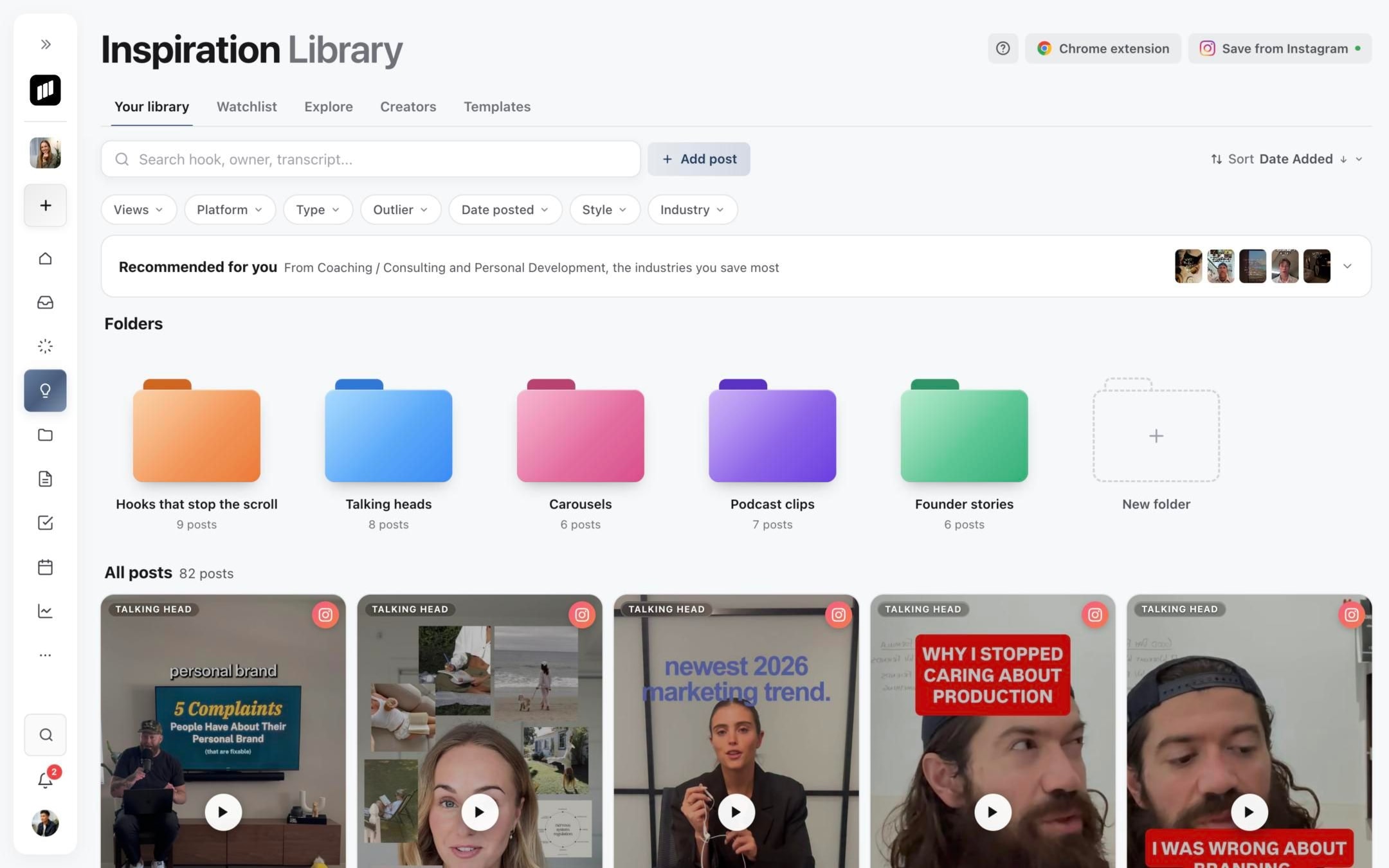
That structure is useful when the library grows or several people need to use it. You can look up an example without remembering where it sat on a canvas.
From saved inspiration to a Sequence draft
1. Save and study the reference
Capture depends on the platform and whether the post is accessible. Some sources can’t be imported.
Open the reference. Sequence’s analysis breaks down the idea, hook and visuals alongside the captured source material. Look for a structure you can adapt, such as an opening contrast followed by a demonstration.
2. Develop it with Skye
- Select Develop into draft.
- Choose New draft or Add to existing.
- Select Develop with Skye.
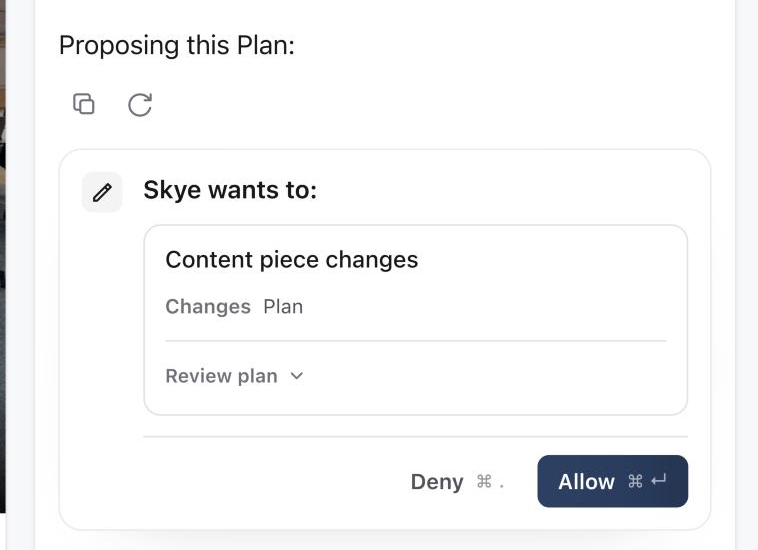
The source is attached to the post, and Skye proposes a Plan for you to review.
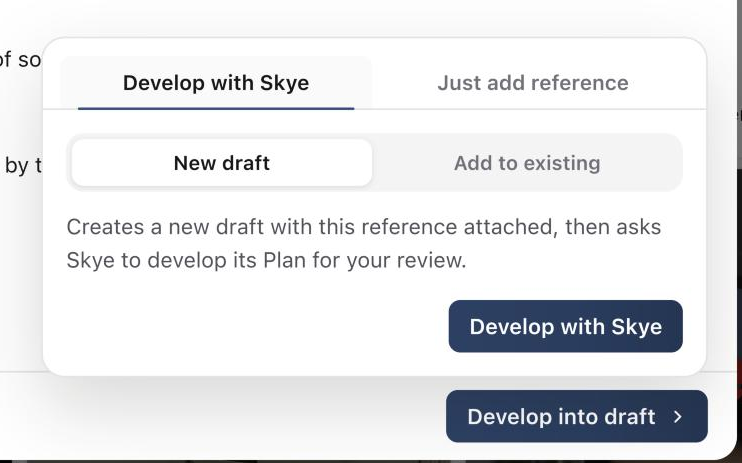
Read the proposal, then select Allow to apply it. If you only want to attach the source, choose Just add reference. The develop-a-reference guide covers both options.
3. Make the draft fit your brand
Brand Brain gives Skye your audience, voice, offers and guardrails. Keep those details accurate, then check the draft’s claims and wording.
For example, a Pilates studio might save a Reel about ‘three things beginners get wrong’. Its version could answer three questions people ask before their first class, using the studio’s own teaching advice.
Keep the useful structure; supply your own advice, footage and offer. A competitor’s promise isn’t a fact about your business.
Organise the work after drafting
An agency planning for three clients needs to track references, scripts in progress and posts waiting on someone else. The team needs to know who owns each post and what happens next.
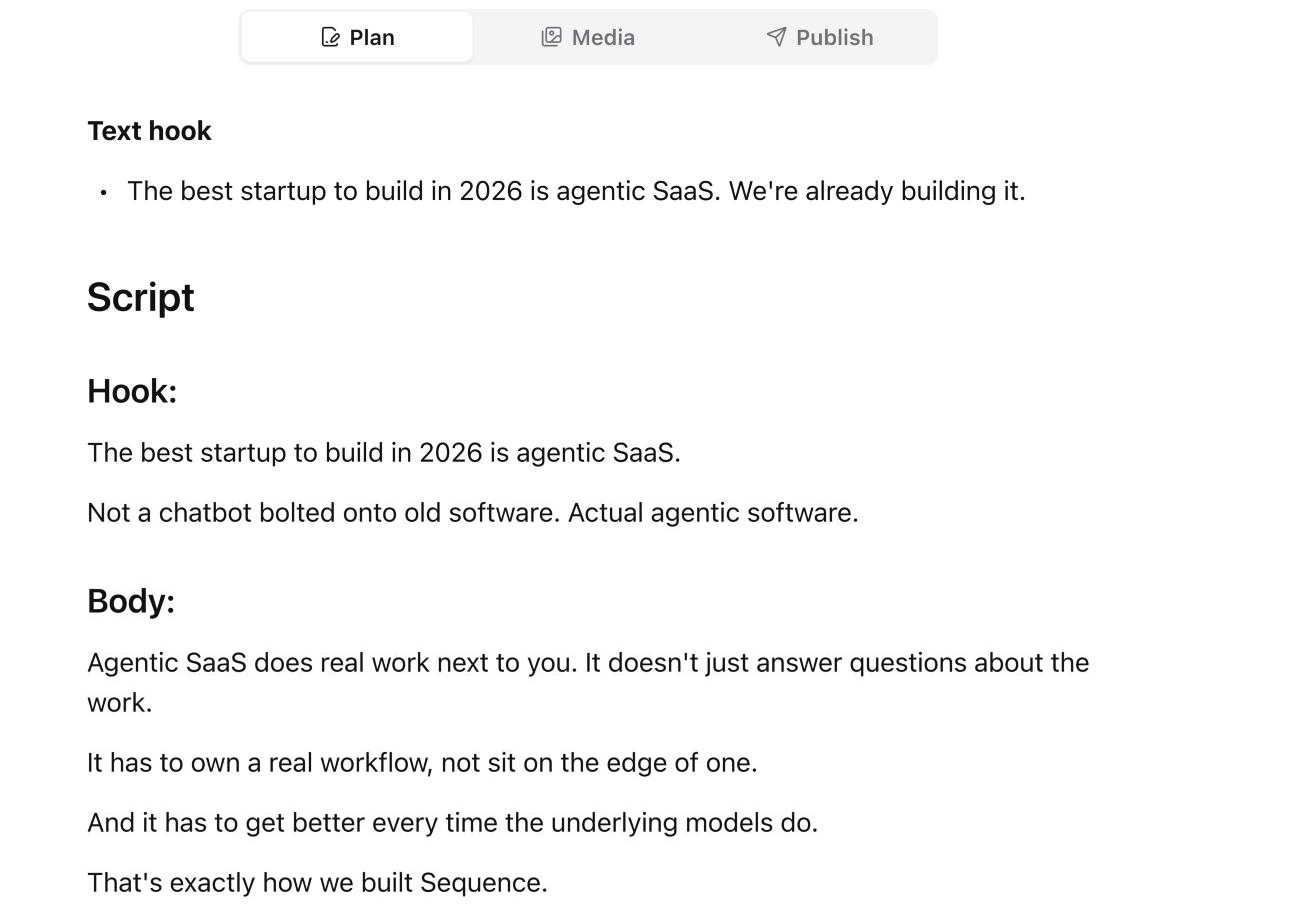
In Sequence, each draft becomes a content record with:
- A Plan, media and publishing details.
- An owner, status and date in the Content planner.
- Campaign grouping through Projects.
You keep developing the same post through media review, client decisions, scheduling and reporting. Features depend on your plan.
Poppy supports collaboration on shared boards, centred on the research canvas. Sequence is a stronger fit when the team also needs to manage social production and publishing.
Sequence and Poppy AI at a glance
| Feature | Sequence | Poppy AI |
|---|---|---|
| Reference organisation | Brand library, folders and search | Boards, groups, folders and Vaults |
| AI drafting from references | ✅ Skye develops a post’s Plan | ✅ Connected sources inform AI chats |
| Brand writing context | ✅ Brand Brain | ✅ Brand voice and saved context |
| Reusable references | ✅ Saved brand library | ✅ Vaults across boards |
| Team collaboration | ✅ Pro: unlimited team members | ✅ Shared boards; check plan seats |
| Post review and approval | ✅ Pro: approvals on the post | Board collaboration; formal post approval not confirmed |
| Native social scheduling | ✅ Free and Pro, with limits | Not confirmed in reviewed product/help pages |
| Moving from Poppy | Manual source and draft transfer | Board layout and chat history are not imported |
Sources: Poppy’s product page, its linked board and Vaults guides, and Sequence’s pricing page. ‘Not confirmed’ means we couldn’t verify the capability in the reviewed pages.
How to migrate from Poppy AI to Sequence
There’s no direct Poppy importer. Bring across useful sources and scripts; Poppy’s board positions, connection lines and chat history won’t be reproduced.
Start with one active campaign
- Pick one brand and the references and scripts you still want to use.
- Save the original social post links to that brand’s Inspiration library. Group supported sources in folders such as Beginner education or Launch references.
- Move brand instructions into Brand Brain. Check offers and claims, and keep brand facts separate from examples you admire.
- Copy scripts you want to keep into a new post’s Plan. Use Develop with Skye when you want a fresh draft from a reference.
- Set each post’s owner, status and intended date. Check its media, caption and connected account before scheduling.
Keep your Poppy work available until you’ve checked the sources and drafts you need. Bring older material across when you have a use for it.
Moving a larger content plan
You can prepare a CSV or XLSX file and use Sequence’s bulk import and field-mapping flow.
- This is a manually prepared spreadsheet, not a Poppy export integration.
- It imports a content plan, not your Inspiration library.
- Preview a small sample first.
- A date or Scheduled label in the file does not schedule a post.
Pricing: compare the team and workload
Sequence
Pro for one brand costs US$29 per month billed monthly, or US$290 per year. It includes:
- Unlimited team members.
- Five connected social or ad accounts.
- 5,000 monthly AI credits.
- Approvals and client share links.
More brands change the subscription price.
Free Forever includes one brand, one member, one connected account and 250 monthly AI credits. Limits include five scheduled posts and five post analyses a month. Approvals and client share links require Pro. Check Sequence’s current plans.
Poppy AI
Poppy’s pricing page lists these plans on annual billing:
- Base: one seat and 2,000 monthly credits.
- Creator: three seats and 8,000 monthly credits.
Check the current checkout for currency, workspace allowances and plan terms. Poppy and Sequence credits aren’t equivalent, so compare your expected drafting workload and the other tools your team would still need.
Which should you choose?
Choose Poppy if a visual canvas helps you connect research and develop ideas, especially across scripts, emails and landing pages. Groups and Vaults give you ways to keep those boards organised.
Choose Sequence if your main job is producing social content for a brand or clients. Its library connects saved references to organised drafts and the work needed to publish them.
Try Sequence with five references from one campaign. Develop one into a draft, bring over a script you already like, and move both through your team’s process.
Written by the Sequence team. Product and pricing details checked on 7 October 2026 against the linked first-party sources. Features, plans and import support can change.